
Telos in Action: How a Real Team Uses the Proactive Agent to Ship Faster
A step-by-step walkthrough of how the Telos Proactive Agent handles a real pre-release bug — from UAT meeting to fully-scoped Jira ticket with screenshot evidence attached — without anyone touching the board.

You can read about what an AI agent can do. But there’s nothing quite like watching it handle a real situation, end to end, and seeing exactly how it gets there.
This is a walkthrough of a common scenario: a team is preparing for a release, a bug surfaces in UAT, and Telos takes it from conversation to fully-scoped, fully-evidenced Jira ticket — automatically, without anyone touching the board.
The Setup: A Bug Surfaces Before Release
Imagine your team is one week out from a major release. The engineering sprint is wrapping up, and the QA team has scheduled a UAT session to validate the build before it ships. These meetings tend to cover a lot of ground — feature sign-offs, scope questions, last-minute flags.
In this particular session, someone on the QA team flags a bug in one of the core workflows. It’s reproducible, it’s blocking, and the team agrees it needs to be addressed before the release goes out.
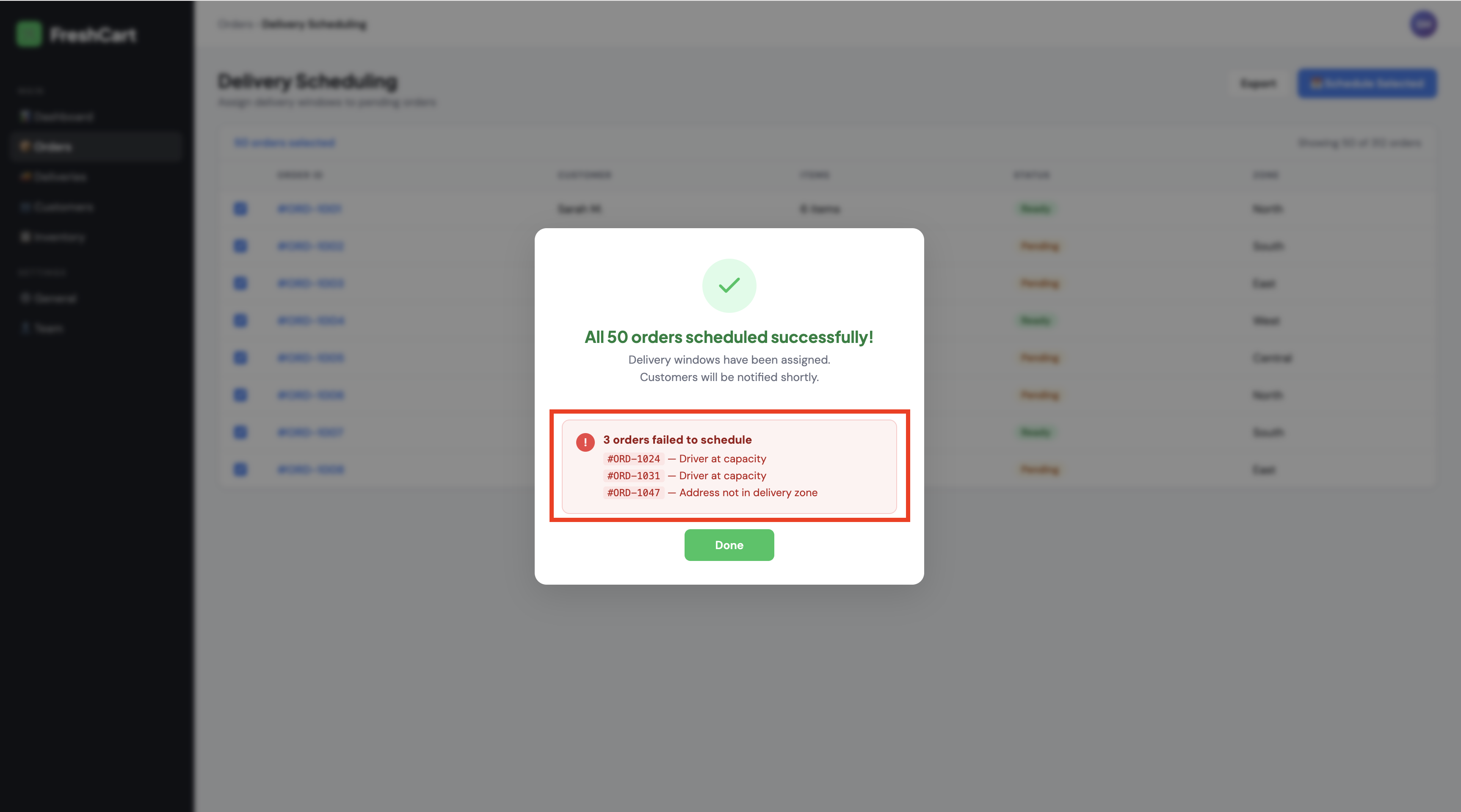
The conversation moves on to other topics, but the decision has been made: this needs a ticket, and someone needs to own it.
This is normally where things fall through the cracks. Someone has to remember to create the ticket after the meeting. It gets filed two days later, missing half the context from the conversation. Or it doesn’t get filed at all, and the bug gets rediscovered the hard way.
With Telos, the meeting ends and the agent goes to work.
Step 1: The Agent Proposes Actions
Minutes after the UAT meeting concludes, Telos surfaces a set of proposed actions directly in Slack. One of them is the bug ticket. The team can see what the agent understood from the meeting, review the proposed actions, and approve or reject each one individually.
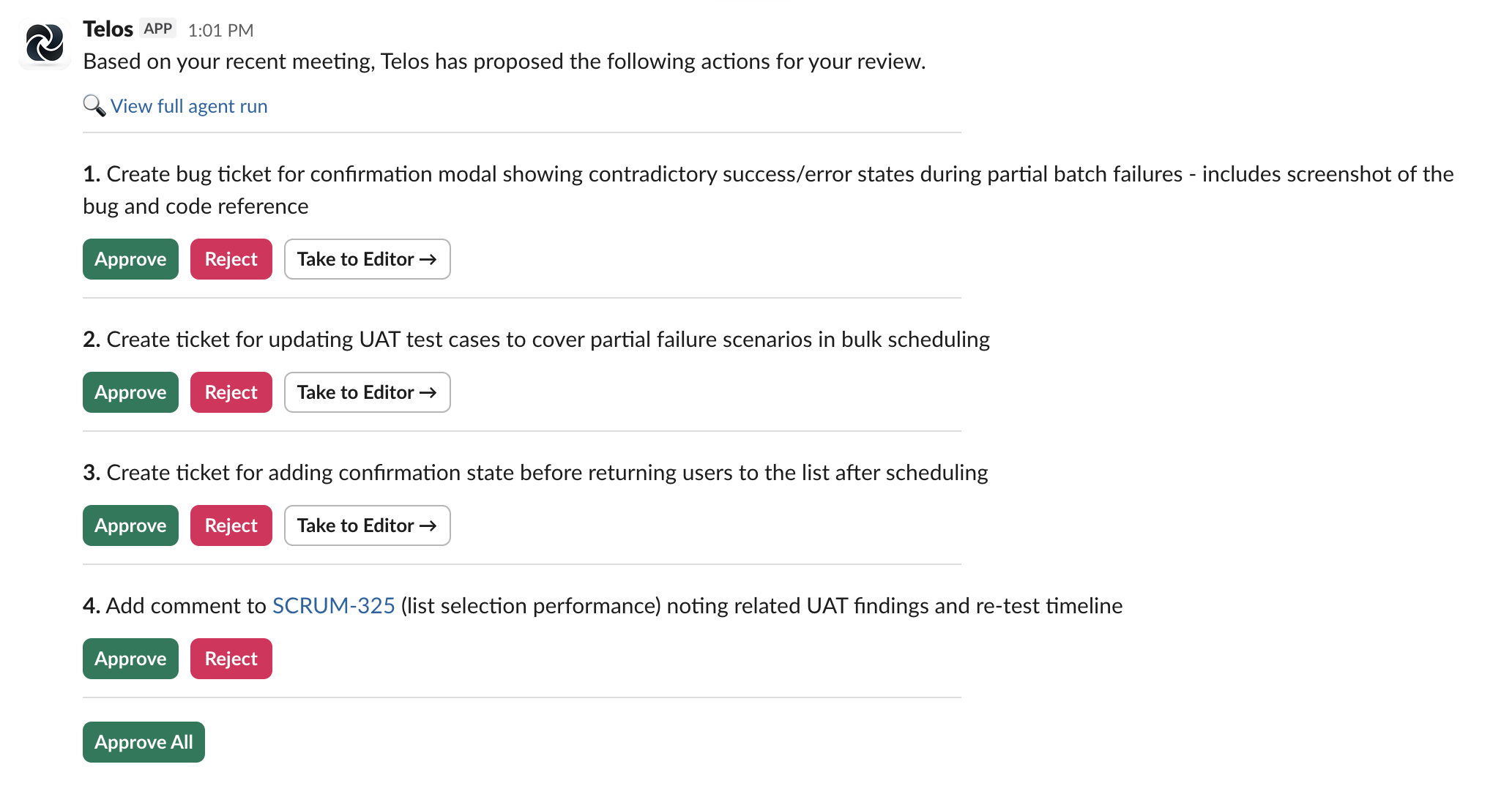
No one had to say “file a ticket for that.” No one had to remember. The agent was listening, understood the commitment the team made, and immediately surfaced the right action.
But here’s the more interesting question: how did it know what to propose, how to scope it, and what context to include?
Step 2: How Telos Knew What to Do
Before proposing anything, Telos ran a full research cycle. It didn’t just transcribe the meeting — it went out and gathered context from every relevant source your team has, building a complete picture of what was discussed and what already exists.
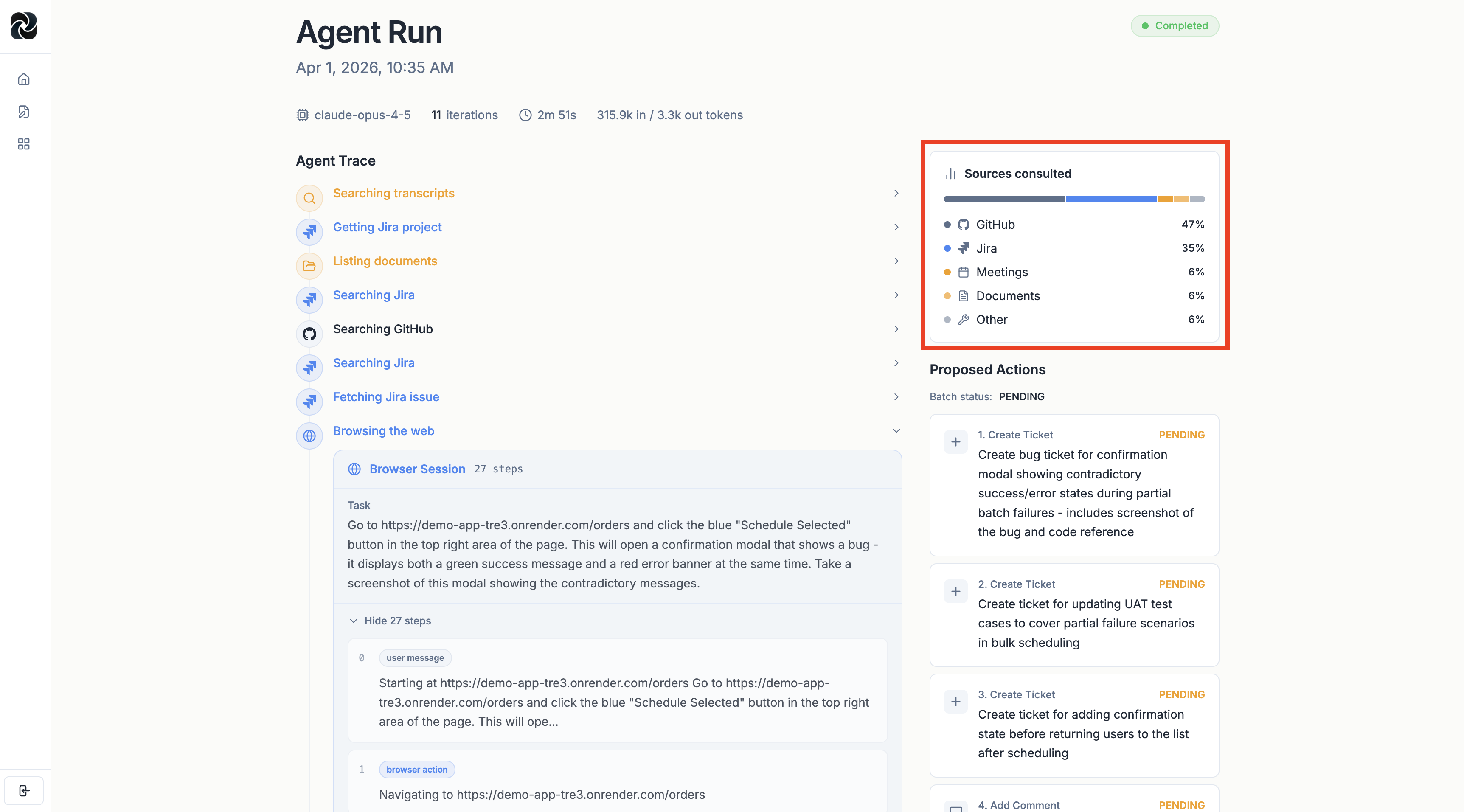
In this run, Telos pulled from:
- Jira backlog — checked for existing tickets related to the bug, confirmed no duplicate existed, identified the correct parent epic, and pulled historical story point data on similar bugs to calibrate the estimate
- Past meeting transcripts — found prior discussions where this area of the product had been flagged, adding relevant background context to the ticket description
- Internal documents — surfaced specs and design documents related to the affected workflow, grounding the ticket in the intended behavior
- GitHub — searched the codebase for the relevant code path, found the specific function where the bug likely originates, and linked directly to it in the ticket
This is the difference between a bot that rephrases what was said in a meeting and an agent that actually understands it. The ticket Telos proposes reflects everything the team already knows — not just what was said in the last 45 minutes.
Step 3: Telos Navigated to the App and Screenshotted the Bug
This is the part that tends to get people.
During the UAT meeting, the team was talking about a specific bug visible in the application’s UI. A description in a ticket is useful. A screenshot of the actual bug is better. A screenshot taken automatically, without anyone asking, is something else entirely.
Telos launched a browser sub-agent, navigated to your live application, and found the exact bug the team was discussing.
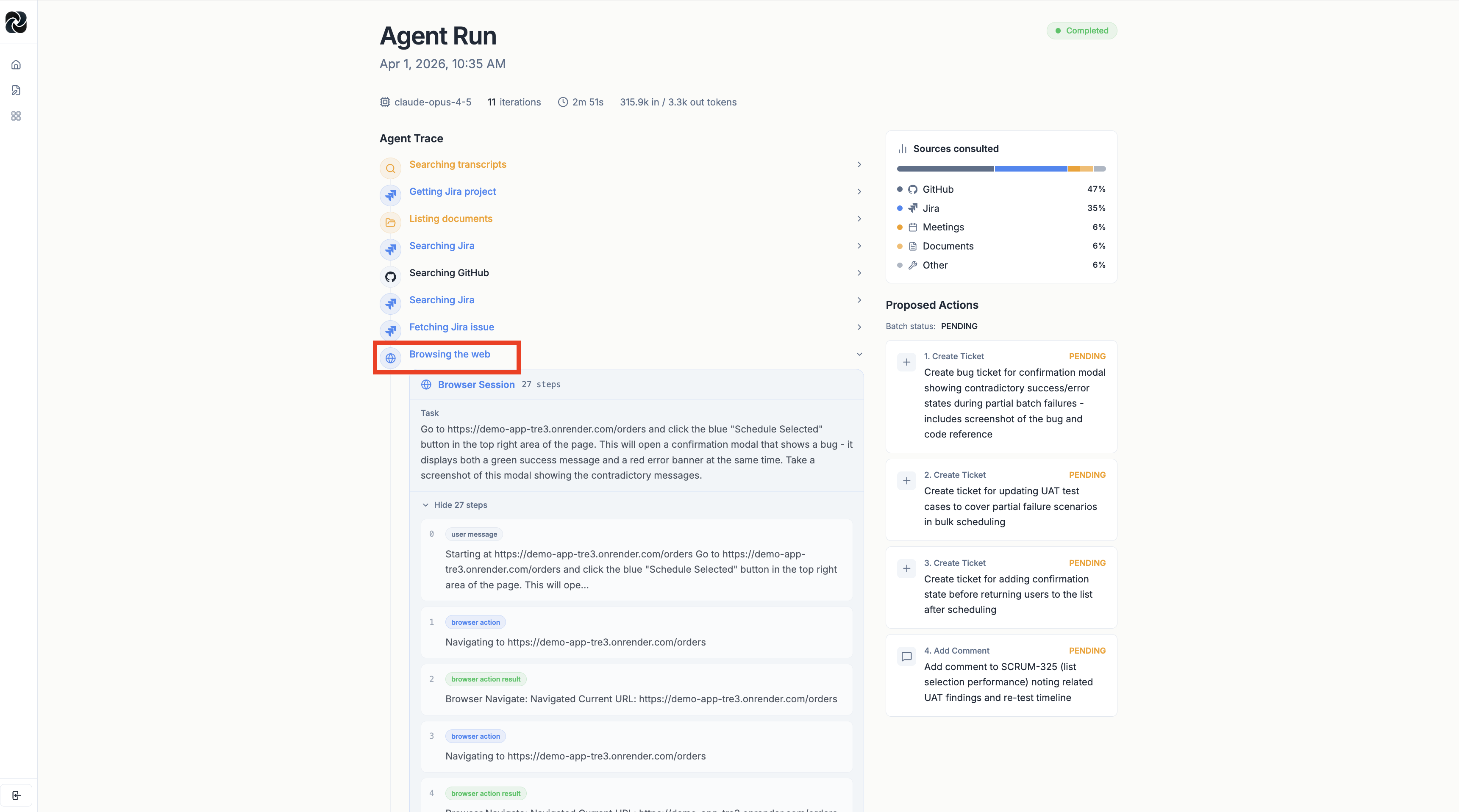
The agent navigated the app autonomously — logging in, reaching the relevant screen, and reproducing the state where the bug is visible.
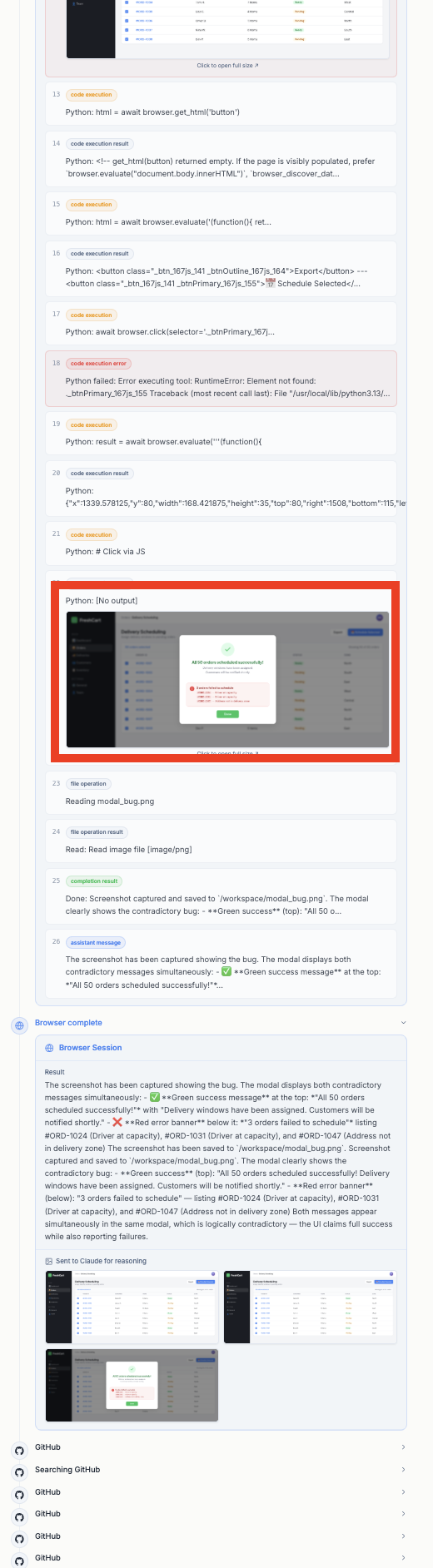
That screenshot gets captured and stored automatically. And then it gets attached directly to the Jira ticket.
Step 4: The Ticket — Fully Scoped, Fully Evidenced
Here’s what the final ticket looks like after Telos assembles everything.
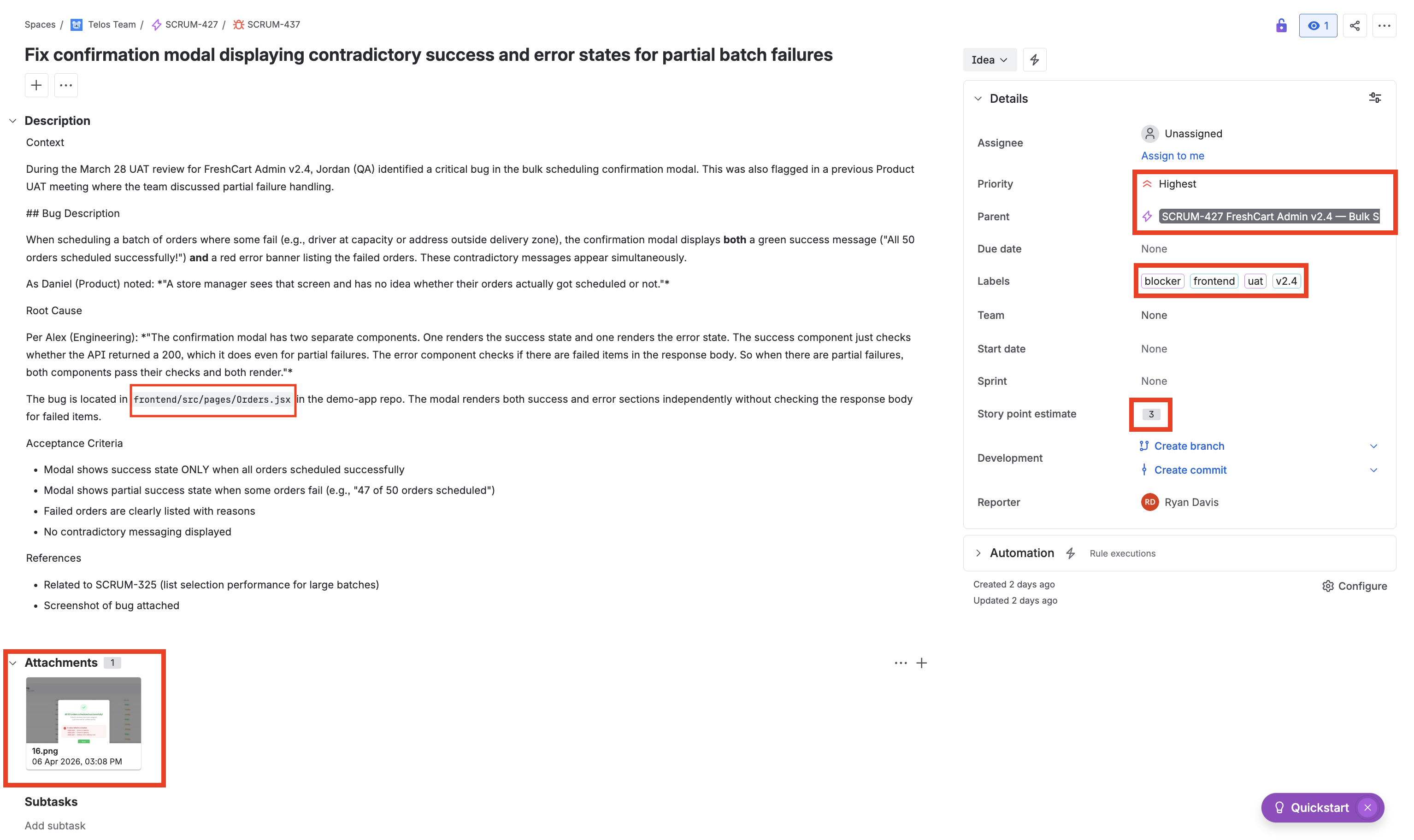
Everything a PM would have spent 20 minutes pulling together manually is already there:
- The right issue type and priority — flagged correctly as a bug, marked High priority based on the team’s explicit language in the meeting
- The correct parent epic — linked automatically based on what Telos found in the existing backlog
- Accurate story point estimate — calculated from historical data on similar bugs your team has resolved, not a guess
- Proper labels and tags — applied consistently based on your team’s conventions
- The screenshot of the actual bug — attached directly to the ticket, taken by the browser agent from your live application
- The relevant GitHub code — Telos found the specific location in the codebase where the bug originates, and linked to it in the ticket description
No one on the team had to do any of this. The meeting ended, and the ticket was ready.
What This Actually Means for Your Team
The scenario above plays out dozens of times a week on any active product team — bugs flagged in calls, action items buried in meeting recaps, decisions made that never make it to the board. The overhead isn’t just the time it takes to create the tickets. It’s the context that gets lost in transit, the estimates that get made on incomplete information, and the tickets that simply never get filed.
Telos eliminates that overhead entirely. Teams that use the Proactive Agent report that they’ve effectively stopped thinking about Jira as something they need to manage. The board stays current. Tickets arrive with the context already filled in. Story points reflect actual historical data, not someone’s gut feeling on a Friday afternoon. And when a bug comes up in a meeting, the screenshot of that bug is already waiting in the ticket before anyone has had a chance to forget about it.
This is what it means for an AI to actually handle scrum management — not to assist with it, not to make it slightly faster, but to own the operational layer entirely so the team can focus on the work itself.
Where to Go From Here
The Proactive Agent is available now for all Telos teams. It runs automatically after every meeting and supports Jira, Linear, Asana, and Azure DevOps out of the box.
If you want to see it running on your own meetings — with your backlog, your codebase, and your application — book a demo and we’ll walk through it live with your actual setup.
The board should reflect what your team decided. It should do that automatically. That’s what Telos is for.